Find the best time without making guests sign up.
Create a poll in minutes, send one link, and let everyone mark which times work. Guests do not need accounts, downloads, or calendar access.
Useful for the plans that usually get stuck in a thread.
Start with a small group chat, or send the same poll to a wider invite list when you need a bigger answer.
Book club
Pick the night most readers can make.
Family trip
Compare weekend dates before booking.
Committee meeting
Find a time that works for busy volunteers.
Dinner plan
Settle on a night before the reservation fills.
Baby shower
Check family availability without chasing replies.
Volunteer shift
See coverage before you choose the schedule.
From options to a final time in three steps.
Add the details
Name the event, add your possible dates and times, and choose simple privacy settings.
Share the link
Send the public voting link in a text, email, group chat, or event thread.
Pick the best time
Watch the results table fill in and mark the option with the strongest availability.
Guests just open the link and vote.
No account. No app. No calendar connection. A guest enters their name, marks which times work, and leaves an optional note.
Start a poll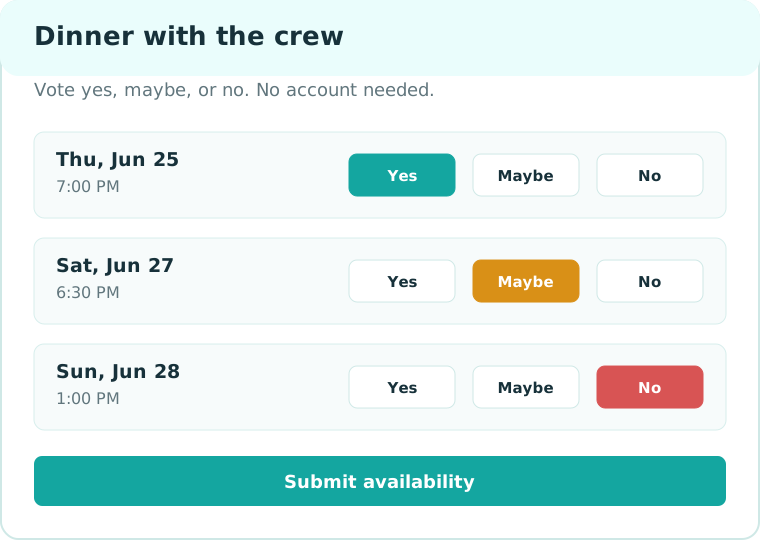
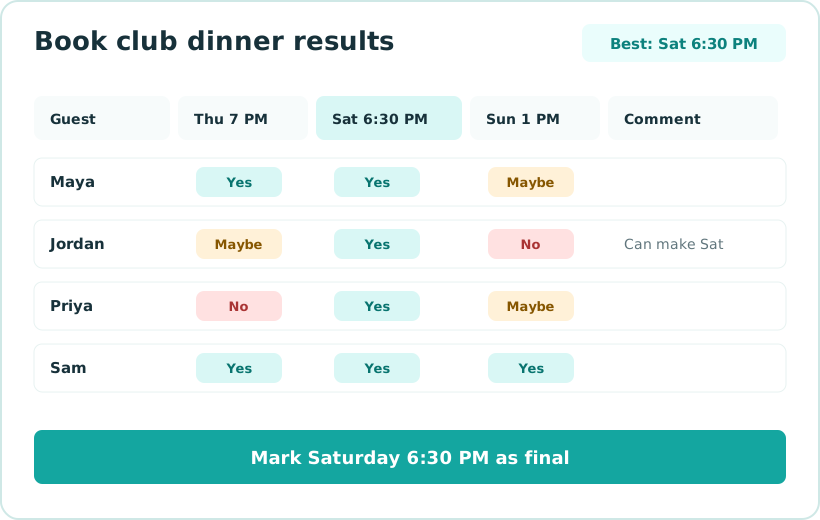
The best option should be obvious.
Group When totals the checks, keeps the full response grid visible for the organizer, and gives you a final-time page to share when the decision is made.
You get the links and tools you need immediately.
Group When is built around one job: collect availability and choose a time without making guests create accounts.
Guest link
Copy the public voting link into a text, email, group chat, or event thread.
Organizer link
Keep your private organizer link to watch results, copy the guest link, and mark the final time.
Final-time page
Pick the winning option and share one clean page back with the group.
One focused workflow
The product stays centered on polls, voting, results, and the final-time page.
Free for quick group polls.
Run the whole poll loop yourself: add options, share one link, collect availability, and choose the final time.
Free
For small groups and plans that need a quick answer.
- Unlimited basic polls
- Up to 20 guest responses per poll
- Guest voting with no accounts
- Results grid and final-time page
Fast answers before you make a poll.
Do guests need accounts?
No. Guests open the shared link, enter their name, and vote.
Can I poll dates and times?
Yes. Add exact date/time options or label an option in plain words like Saturday brunch.
Can I keep guest names private?
Yes. The organizer can keep guest names private while still seeing the full admin results.
Can I close a poll?
Set a closing date when you create it, or choose a final time when you are ready.
Can I use this on mobile?
Yes. The guest voting page is designed for phones and small screens.
What happens after I pick a time?
Group When creates a final-time page you can share with the group.
Can I ask for help with a poll?
Yes. Email the poll link and what decision you are trying to make. We will reply with the next useful step.